📝 内容摘要
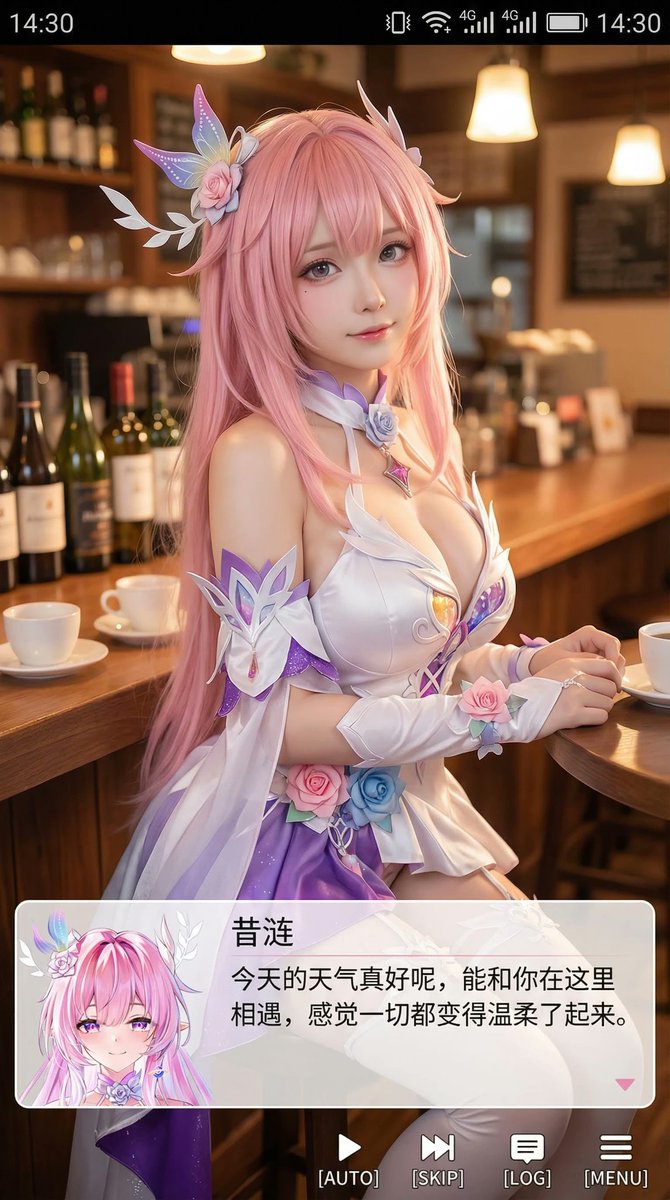
GPT-Image-2 人像摄影提示词案例,聚焦「9:16 Cosplayer 人像截图」的场景氛围、光线质感和人物造型。
🎨 中文提示词
生成一张竖版手机截图风格的图片,整体比例接近 9:16。画面中心偏上是一位真人 coser,扮演(角色名称)的二次元角色。人物为写实风格,但五官略带动漫感,皮肤细腻,眼睛稍大,表情温柔地看向镜头,坐在室内的休闲场景中,例如咖啡厅或酒吧吧台前,背景有符合场景的道具。画面最上方加入手机系统状态栏 UI,包括时间、电量、信号、网络等图标,让整张图看起来像手机截图。画面底部叠加一块宽大的半透明 galgame 风格对话框,对话框左侧放一个与画面人物对应的动漫或 Q 版头像;对话框右侧排版文字:第一行用较大字体显示与前面相同的角色名字,下面一到两行显示一段适合这个角色人设的、温柔治愈风格的简体中文台词,由你自动创作。再在对话框下方加一条操作栏,仿照 galgame UI。整体风格高清、细节丰富、光线柔和、二次元与真人写真自然融合。
🎨 英文提示词
Create a vertically oriented image in a smartphone screenshot style, with overall proportions close to 9:16. Slightly above the center of the frame, place a real-life cosplayer portraying a fictional character (character name), as a 2D anime character. The person should have a realistic style, but with facial features that are subtly anime-like: smooth, fine skin texture, slightly larger eyes, and a gentle expression looking toward the camera. The cosplayer is seated in an indoor casual setting, such as in a café or in front of a bar counter, with background props that match the scene.
Add a smartphone system status bar UI at the very top of the image, including icons for time, battery, signal, network, and so on, so the entire image looks like a phone screenshot.
Overlay at the bottom of the image a wide, semi-transparent galgame-style dialogue box. On the left side of the dialogue box, place an anime or chibi-style avatar corresponding to the person in the image. On the right side, arrange text: the first line uses a larger font to display the same character name as above; below it, use one to two lines to show a short Simplified Chinese line of dialogue in a gentle, healing style that fits this character’s persona, written and created by you automatically.
Then add an operation bar below the dialogue box, imitating the galgame UI. Overall style should be high-definition with rich details, soft lighting, and a natural blend of anime aesthetics and real-life portrait photography.
📷 图片